Transfer files, entire directories, and nested subfolders directly with iOS app containers and Android storage over high-speed USB. No iTunes bloat. No Android File Transfer crashes. Pure native speed.
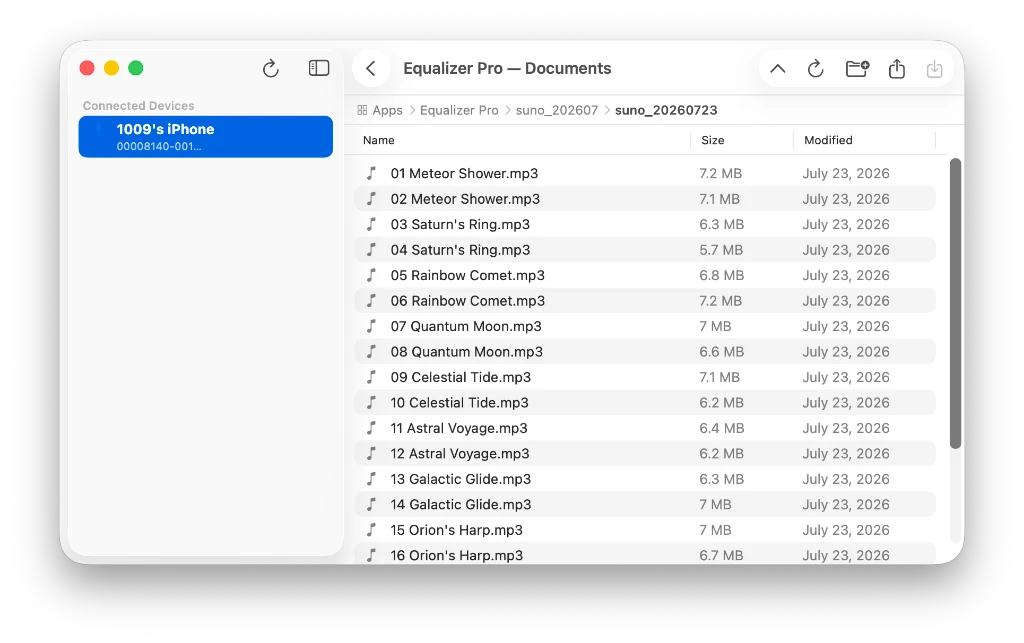
Designed for users who need fast, structured file and folder access across iOS and Android with complete subfolder hierarchy support.
Access iOS app sandboxes/Documents folders and full Android storage volumes (Internal Storage & SD card) with deep directory structures.
Seamlessly drag files and folders to and from macOS Finder directly into your iPhone, iPad, or Android phone with real-time transfer progress.
Pair Mac folders with your iOS app containers or Android storage for seamless one-way or bidirectional sync. All core file management and transfer features in DeepShare are completely free without restrictions—only select advanced tools like folder sync have limitations and may require DeepShare Pro (available via in-app upgrade).
Press Spacebar or right-click to instantly preview photos, videos, audio files, and documents directly from your device without extracting first.
Plug in your iPhone, iPad, or Android device via USB—DeepShare instantly detects connection events, handles lockdown or MTP protocols, and auto-connects.
Instantly find items with live filter search, typeahead matching, full keyboard navigation, and clean breadcrumbs for fluid file browsing.
Transfer files between your Mac and iOS or Android devices in three simple steps.
Connect your iPhone, iPad, or Android phone via USB cable. DeepShare detects it automatically.
Choose an iOS app container or browse your Android internal storage and SD card directories.
Drag and drop files, sync folders, preview media, or queue batch transfers at full USB speed.
From the same developer
Explore our other premium Mac & PC apps crafted with the same care for performance and design.